Ryan Tang
SGS (via CodeMode)Lead PM, Designer & Researcher2020

Redesigning the PM experience for global printing

Southern Graphics Systems (SGS) bespoke ERP, MySGS, had become a patchwork of workarounds for 95% of users. I led product strategy, research, and design to rebuild navigation, the PM dashboard, and order entry, leading to improved productivity.

EnterpriseResearchSystems DesignERPInformation Architecture
+0%
Task success
−13.5%
Skipped tasks
0s
Avg. time saved on core tasks
0s
Target savings on simple tasks

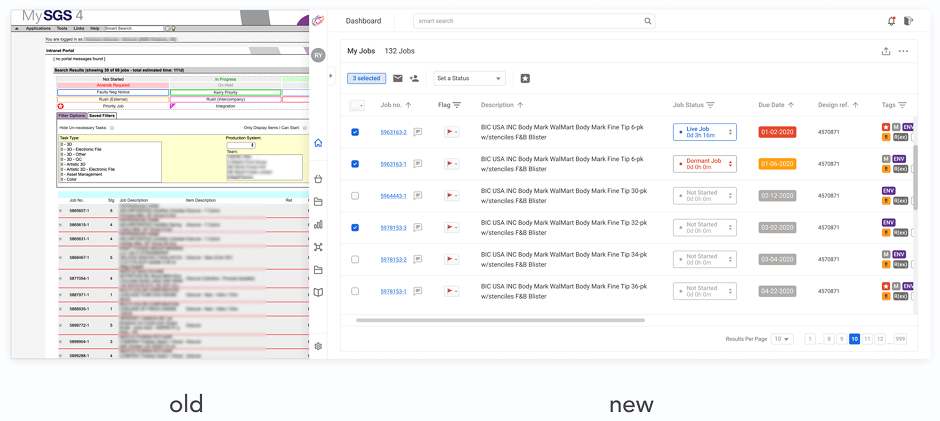
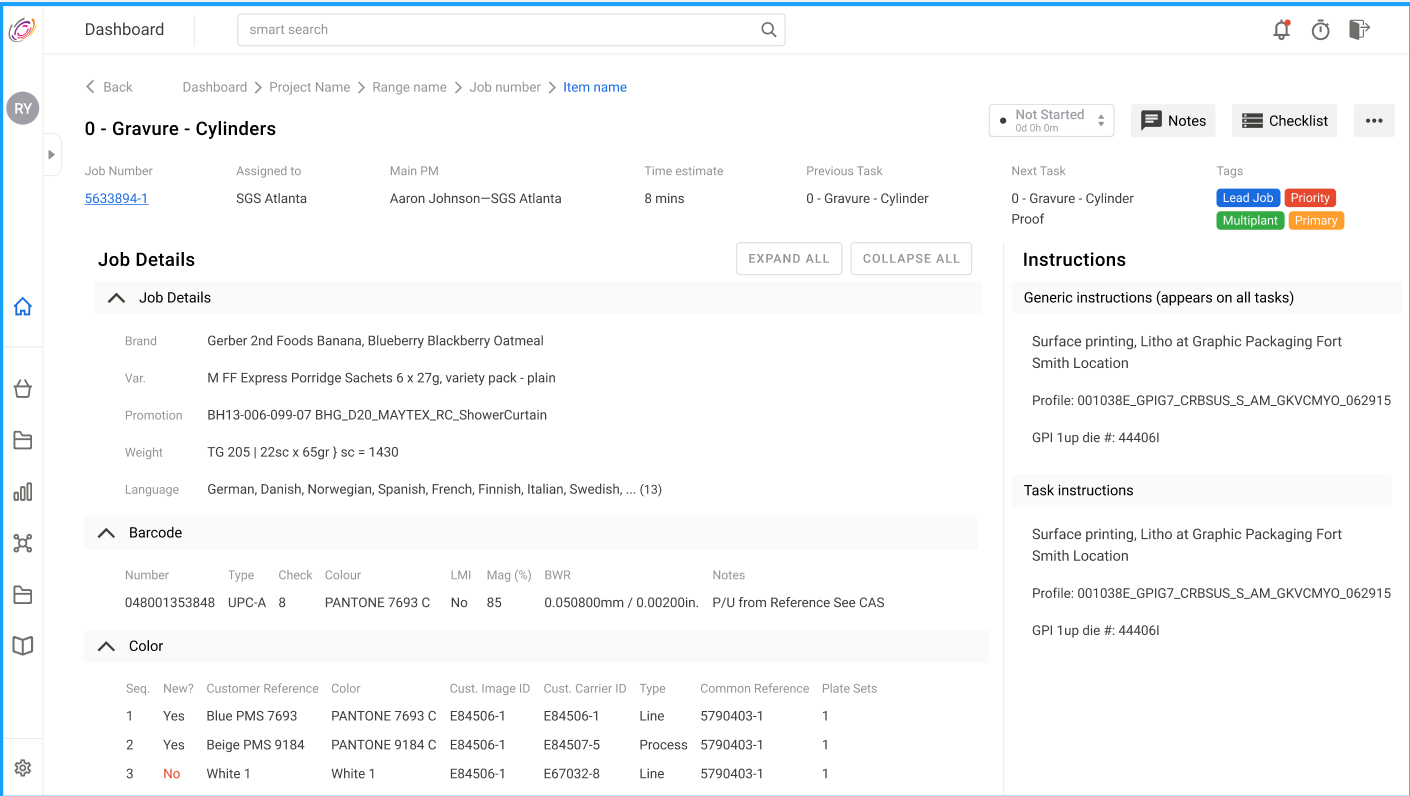
Before and after: legacy MySGS job surface versus the next-gen dashboard directionBefore and after: legacy MySGS job surface versus the next-gen dashboard direction

Southern Graphics Systems (SGS) is a global leader in integrated packaging and marketing production with 3000+ employees across 4 continents. To improve process efficiencies, SGS turned to CodeMode, where I led redesigning the digital experience of its bespoke enterprise resource planning (ERP) tool, MySGS.

Where PMs and sites sat the IA and research had to work across regions, not one plant's habit.Where PMs and sites sat the IA and research had to work across regions, not one plant's habit.

MySGS is primarily for managing operations across various stages of delivery and facilities, with users on the platform for the majority of their work day. As SGS grew and increased project complexities, there was a rapid increase in reported users errors on the platform.

This led the team to believe there was an opportunity to significantly improve efficiencies in the platform in addition to ongoing organizational efforts. Limitations in the current system lead 95% of users to utilize some form of workaround obscuring the ‘single source of truth’ and leading to time lost troubleshooting or information finding.

What we were replacing: legacy intranet job lists, navigation, and cognitive overload that pushed people back to trackers.What we were replacing: legacy intranet job lists, navigation, and cognitive overload that pushed people back to trackers.

Goals

From SGS, I was given the business goal: to eliminate non-value added labour.

I took the business goal and determined the key success metrics were likely going to be:

  1. decrease time required per task, and
  2. increase positive user sentiment towards the system.

Given the variety and number of tasks users are presented with even small time savings would add up. This also provided me an opportunity to rapidly consolidate emerging use cases.

My goal was to reduce 5 seconds off the time it would take users to perform simple core tasks. I also chose the goal of improving user sentiment, to decrease onboarding time needed when launching the new system.

My role

I came on originally as a researcher, but when the project grew in scope, I was promoted to leading as product manager and designer due to my diverse skill set. By the end of the project I was doing IC work, managing an internal team of two additional designers, one additional researcher, along with stakeholder management and communicating with the client side product teams. This stretched my capacity, and also allowed me to learn valuable skills in leverage.

My responsibilities were diverse, but typically included meeting with users multiple times a week, coordinating with stakeholders, strategizing solutions, and creating UI and prototypes to communicate the design as needed.

My Approach

Internal Research

To drive the start of my design process for such a highly specialized product, I needed to build contextual and domain knowledge by interviewing MySGS users around the world, along with auditing the system first hand, reviewing standard operating procedures, and learning from client side product teams.

In the past 15 years, MySGS saw incremental releases to accommodate emerging use cases. As the system got more complex, users were experiencing increased friction in their experience. Standard operating procedures were introduced to help train users and consolidate the tribal knowledge present. However, operating methods continued to evolve at different sites and new workarounds continued to popup as users tried to find their own way of solving their problems.

User created individual workarounds led to redundancies, miscommunications, and revenue losses, not to mention frustration and the “immeasurable” amount of time wasted validating information. As I interviewed and met users I started to get a better picture of the pain points users faced.

Contextual inquiry: stills from remote sessions (sensitive details removed where needed).Contextual inquiry: stills from remote sessions (sensitive details removed where needed).

Evaluating Workarounds

I then proceeded to evaluate the workarounds based on four high-level problems I saw users trying to solve with them.

Information accuracy

Sheets, notes, docs — parallel “sources of truth” when the system felt unreliable.

File management

OneDrive, Box, Dragonfly, local storage — chasing the latest file outside MySGS.

Communication

Notes and paper — especially for coordinating with operators on the print floor.

Time management

Calendars, reminders, email — tracking follow-ups the ERP didn’t surface clearly.

  1. Information accuracy: Excel, Google sheets, Note taking apps, various text documents, physical document folders This was the most common observation. Users needed accuracy and consistency of information to build out their workflow around. Users used these workarounds to keep track of information as the primary ‘source of truth’ if they were the primary PM on the project.

  2. File management: OneDrive, Box, Dragonfly, iCloud, local computer storage, Excel, Google sheets Users coordinating and finding files across various platforms to ensure they have the latest versions or are able to find historical files.

  3. Communication management: Note taking app, various text documents, post-it notes, physical paper systems. This one saw a stark difference between communicating to clients and to their team. Users used more of these workarounds to coordinate communicating to their operators (printers).

  4. Time management: Calendar app, reminders app, post-it notes, emails, outlook Due to the various projects users had to manage, knowing when to check up on things, finding out status, and following up were essential.

Survey sent to 400+ PMs revealed that personal Trackers serve need and dashboard only used when necessary.Survey sent to 400+ PMs revealed that personal Trackers serve need and dashboard only used when necessary.

Moving forward I decided to frame these various workarounds through the lens of user pain points. This would allow us the opportunity to know what we should design bespoke, and what existing technology we could leverage.

Differentiation: legacy MySGS along side work around, and the flexiblity of the new MySGSDifferentiation: legacy MySGS along side work around, and the flexiblity of the new MySGS

Where to spend the effort

Based on the insights and observations I gathered, I confirmed that users experienced the most friction in six core areas:

Client collaboration
Project management
Resource management
Enterprise-to-enterprise workflows
Data analytics
Technical issues (delegated to platform team)

Project management — where PMs spent most productive time after a deal was won — became the anchor for scope.

  1. Client collaboration: communicating back and forth with clients to validate requirements.
  2. Project management: ensuring that a project is moving through its lifecycle promptly and issues are addressed immediately. This includes entering in orders, upgrading an order’s status, and communicating with relevant parties.
  3. Resource management: assigning the correct people at the right times to make sure the project stays on-time and within budget.
  4. Enterprise to enterprise workflow management: dealing with enterprise integrations and the client specific requirements and data captures.
  5. Data analytics: this primarily affected more senior users managing teams and needed to find data driven ways to optimize workflows.
  6. Technical issues: this included system downtime, time-outs, and errors.

In terms of meeting the business goal of eliminating non-value add labour, I saw that the biggest opportunity was in addressing issues related to project management. This is because the majority of a user's role was spent in the project management zone, after the project has already been negotiated. The user would enter the order into the system and see it through to completion. This made up the bulk of the productive time users spent on the system.

Primary hypothesis if we addressed problems in the project management area of the system, then there will be a decrease in time spent on core tasks, for all users, not just PMs.

Secondary hypothesis was if there is less friction in the area of the system where PMs spend most of their time then there would be more positive sentiments towards the system.

Technical issues were going to be resolved by the client side development team as they migrated and optimized their file systems. So, I kept this mostly off my plate confident that the solutions we were going to come up with would compliment well with the on-going system performance optimization.

In exploring other core areas of friction, we led several design sprints to identify opportunities for improvements.


Design Sprints

In our first design sprints, we worked with stakeholders to determine challenge statements to align with the team around. We met for our first design sprint with SGSs managers in Toronto, Canada with managers from across the US and UK. Due to time constraints each of our design sprints lasted 3 days with 8 hours of time together each day.

We took a pretty standard design sprint model with lightning talks to start as participants wrote How Might We’s. This brought us to a more collective context and defined the problem. We then did affinity mapping dot voting of the HMWs to begin to narrow down the scope of the solution.

We then spent time creating a full customer journey with the team, and all context holders, present. This allowed us the opportunity to identify illogical flows, and reasons for some perceived inconsistencies. For example, a user needs to go to screen B before screen A because at that particular site they have data for screen B but not screen A.

Then we got a chance to do some crazy 8’s and sketching. This really opened the door to various ideas that were possible along with what they might look like. We talked about the different ideas everyone had and then voted to get a better understanding of what people thought were the most feasible. If we had additional time we’d spend some time doing a larger Q/A as it was a rare opportunity to have so many context holders present. I then had the opportunity to document the results.

We repeated the design sprints each time there was a major challenge that we needed quick alignment on. I had a chance to lead our final design sprint in the UK with the client side product team and the first internal designer we encouraged SGS to hire.

In that design sprint, I did things a bit differently due to the audience in the room being made up of largely development managers, regional managers, and designers. Rather than regular dot-voting of solutions, I created a value vs feasibility canvas for us. Participants affinity mapped onto the canvas various ideas generated. This allowed us to have a list of improvements that the development team could immediately implement along with a brief taste of what the future roadmap ahead would look like.

Sprint artifacts: sketching and mapping before high fidelity.Sprint artifacts: sketching and mapping before high fidelity.


Information Architecture

The foundation of the redesign was enabling PMs to be more efficent through information dense workflows and spaces. To do this I needed to define what information was important and when. This would ultimately drive the navigation and IA.

Tree Testing

Observing users, it became apparent that we needed to review the navigation of the system. I noticed almost all of the users I observed had gotten lost in the system as they were trying to accomplish a regular task.

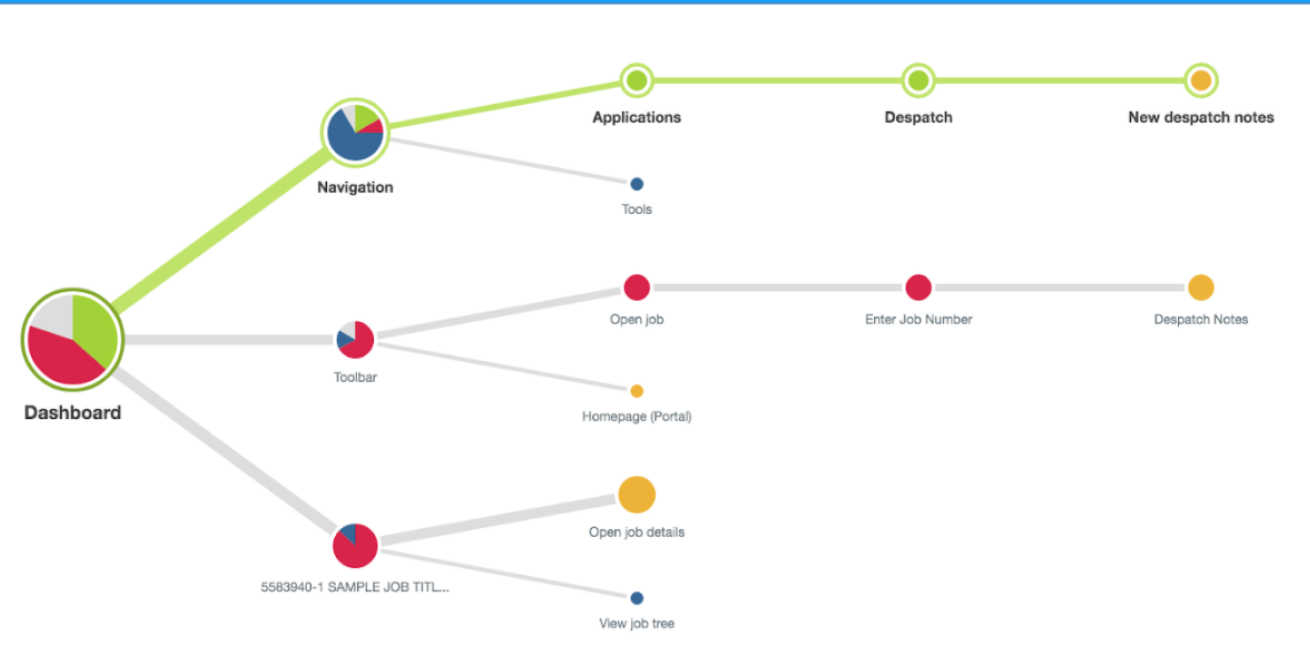
To test the effectiveness of the navigation, I set up a tree test using Optimal Workshop and first tested the current system to create a baseline metric. By removing visual cues and only keeping labels, the treetest was a way to test users' perceptions of where they needed to navigate in order to accomplish the task. I then created additional treetests for new navigation maps I wanted to test.

Tree test: where people expected to go from the dashboard for common jobs.Tree test: where people expected to go from the dashboard for common jobs.

Dashboard to clone job and job details the "get context" loops we saw in observation.Dashboard to clone job and job details the "get context" loops we saw in observation.

We recruited participants from the large internal list of PMs and included participants from various sites and with different experience levels.

After 3 treetest iterations supplemented by continued user engagements, I was able to create a navigation map that tested significantly better than the current navigation map.

Users had 31% improvement in task success rates, 13.5% less skipping tasks, and shaved off an average of 2 seconds of the time it took them to finish core tasks. Users were also more direct in their paths.

Users were more not only getting to their goals more often and more quickly, but that they were also doing it with more confidence.

Red routes

As I tested the navigation and engaged users I also noticed several red routes, parts of the user journey that users frequented the most, and were often areas where friction was the most noticed. These areas included the main dashboard, search screen, and job creation screens. PMs needed to use the search screen due to not finding the information they need on their dashboard.

Redroute analysis showed most common tasks PMs did, helping to prioritize behaviours to improveRedroute analysis showed most common tasks PMs did, helping to prioritize behaviours to improve

I made specific notes on how all PM’s needed to go through those specific screens multiple times a day usually because of validating information. This was important as it showed the current mental models users had around their work flow, so any solution we created needed to account for this.

Card Sorting

To continue building our understanding of how users found what they needed in the system, I asked participants to group labelled cards into like categories in an open card sort. This created an initial framework that revealed similarities, and stark differences in how users viewed the relatedness of different areas and tasks in the system.

OptimalSort:validating groupingsOptimalSort:validating groupings

I then proceeded to create a closed card sort to validate the findings from the open card sort. The insights from this process informed the final navigation tree and helped to prioritize our design process.

Card-sort similarity — input to navigation and related-task grouping.Card-sort similarity — input to navigation and related-task grouping.

Data Schema Prioritization

To add confidence and ensure a holistic view of user behaviour, I gathered field usage analytics and documented other fields needed for basic orders.

Field usage: which job data was touched in practice.Field usage: which job data was touched in practice.

Schema sketch, what "basic job details" had to mean before we exposed it everywhere.Schema sketch, what "basic job details" had to mean before we exposed it everywhere.

Dependencies before we simplified — honest picture of what had to connect.Dependencies before we simplified — honest picture of what had to connect.

Userflows

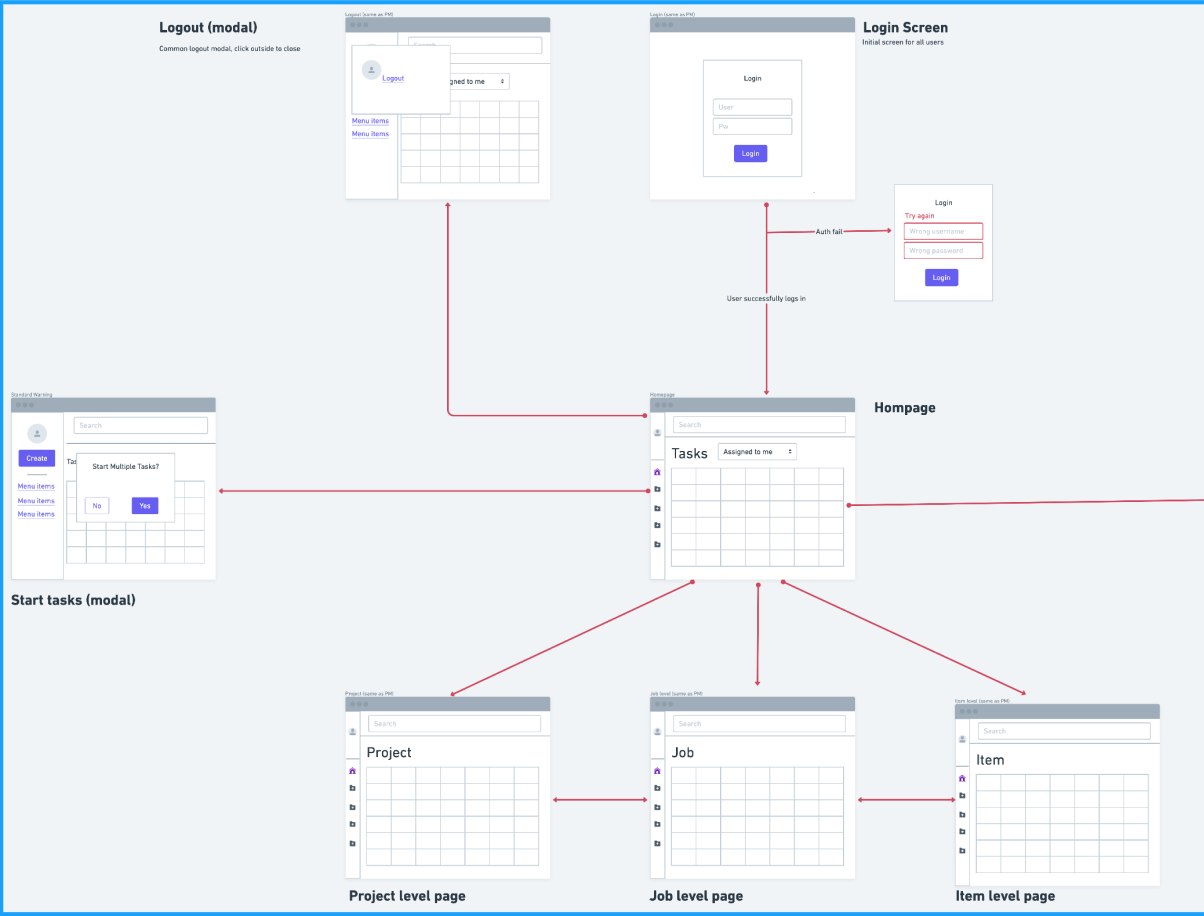
With dataflow, and IA accounmted for, I created MVP userflows.

Minimum viable pathMinimum viable path

Clone-job flow.Clone-job flow.


Design Solutions

Prioritizing problems

After quite an extensive research phase, I worked with stakeholders to prioritize what problems needed to be solved. I proposed we use an effort vs value model to prioritize what problems we were going to tackle. I chose this because of our fast paced timeline and to maximize the effectiveness of our terms of engagement.

Out of the various areas we could’ve dived into, it was agreed that our focus would be in addressing:

  1. Active order management dashboard, navigation, IA for life after the commercial handoff.
  2. Order entry and client engagement next, once the management loop was credible (and order entry turned out to be the heaviest single task in practice).
  3. Parallel platform work performance and file migration stayed with the client team; UX had to complement that timeline, not pretend it was done.

System shape

The hub diagram was a shared reference for "monolith we have" versus "modular direction".

Capabilities hub: how we talked about consolidating modules versus the legacy monolith.Capabilities hub: how we talked about consolidating modules versus the legacy monolith.

Dashboard

I hypothesized that if we addressed user maladaptive UX patterns emerging from the dashboard screen then we would reduce the majority of the user friction in the active order management process.

Legacy intranet: annotated job workflow on the surface PMs were trying to replace with trackers.Legacy intranet: annotated job workflow on the surface PMs were trying to replace with trackers.

Currently users were under utilizing the dashboard due to it being difficult to find information on. Users instead opted often to use their own excel trackers or the limited system search functionality. This showed us an opportunity where we could greatly improve the dashboard function and experience.

I began this process with sketching and internal crazy 8’s sessions with my fellow designers.

Increasing Visibility on the dashboard

For PMs, the dashboard is the headquarters of their workflow. Unfortunately a key pain point users associated with the dashboard was the confusion due to lack of visibility of content they cared about.

Legacy job list: the density problem we were designing away from.Legacy job list: the density problem we were designing away from.

Low-fi hierarchy — project, job, item — testing wayfinding before visual polish.Low-fi hierarchy — project, job, item — testing wayfinding before visual polish.

Wizard for switching table contexts without losing column logic.Wizard for switching table contexts without losing column logic.

In the redesigned dashboard I wanted to provide users with tools to see what they needed and reduce the cognitive load while easing the transition of their working mental models.

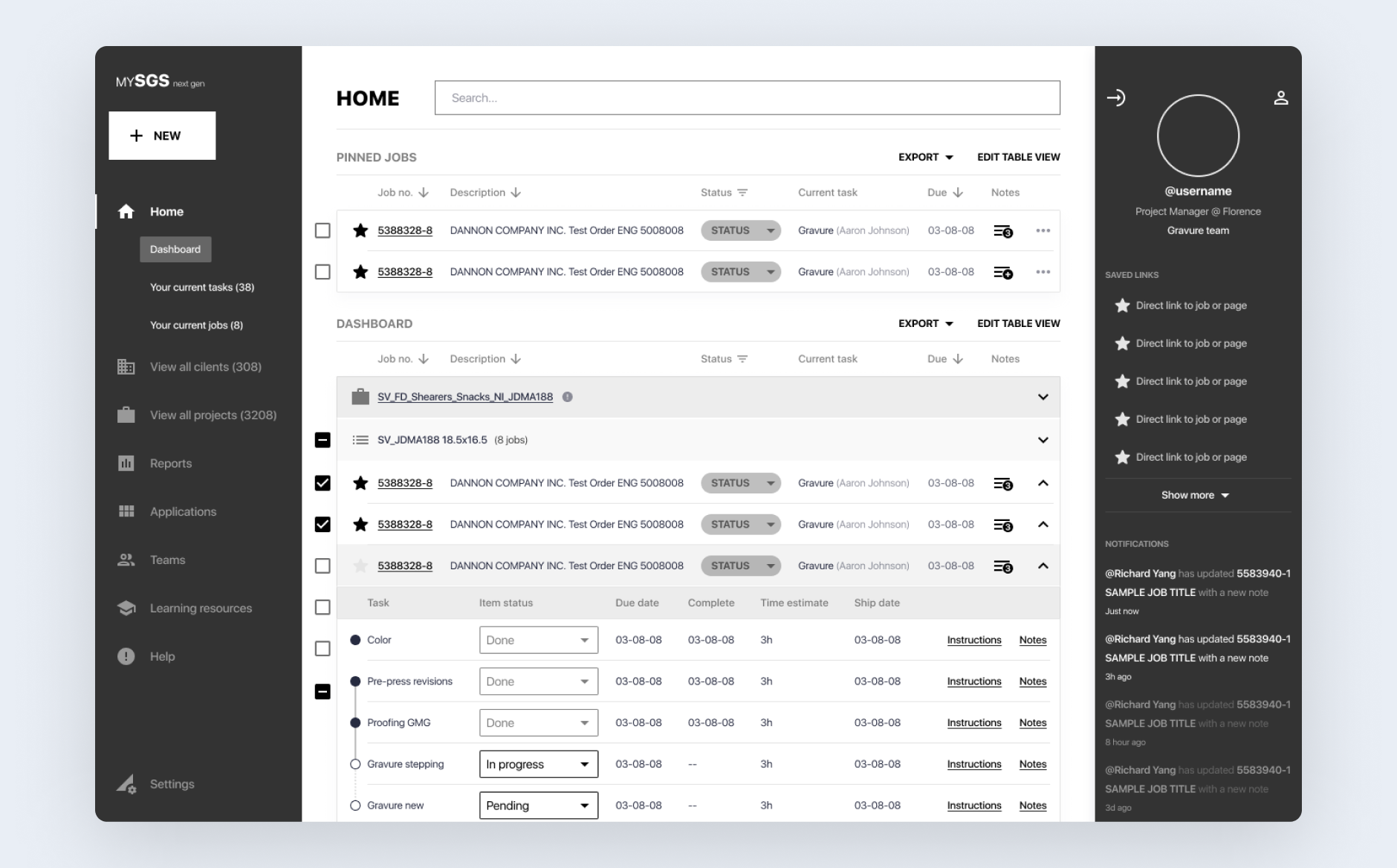
PM dashboard concept — tasks, pinned jobs, and scalable order table
1Operational home — tasks and pinned jobs surface what needs attention without opening search
2Scannable table — density tuned for enterprise PM work, not consumer minimal UI
3Room for saved views and team-published columns — reduces one-off Excel trackers

Next-gen home — annotated callouts for the core dashboard loop we usability-tested with PMs.

To do this, we created a custom table builder. We focused on this because of the unique data requirements of each PM. Allowing users to create the views that were most relevant for their unique workflow allowed them see what they needed, where it could be the most useful. This was effective because users typically maintained the same workflow across several projects, this would negate the interaction cost of creating a custom table anyway. Team leads were also able to create table views to be distributed to their teams further decreasing the interaction cost and increasing consistency.

Edit table views to have bespoke PM view eliminating need for excel tablesEdit table views to have bespoke PM view eliminating need for excel tables

To compliment the custom table views we also designed dynamic table filters. This allowed users to quickly sort, filter, and search individual columns or rows for the information they needed and prevented the need for a system wide search helping us keep the system performant.

Mass Editing

Another feature we designed for was mass editing. This was a heavily requested feature already present in the development roadmap, and we saw the revitalized dashboard as an optimal place to implement it. In the old system, users needed to manually edit each order, we now allowed users to edit and manage several orders simultaneously.

Design System

I realized that as our design scaled we needed to consolidate our styles and begin creating an internal library of patterns to draw from and communicate to developers. Using Salesforce’s Lightning design system as a base we created components that adhered to an atomic naming system to help our team understand usage and grouping.

With this we were able to convey a more consistent look, feel, and experience to users as the scope of our redesign grew.

Part of our component sheet for handoff.Part of our component sheet for handoff.

PM-facing complex search using the DS.PM-facing complex search using the DS.


Concept and Usability Testing

I started to test with users at the earliest opportunity. Typically the tests were done remotely via screen share and using google slides or a figma prototype. Users would navigate the screens as I asked them to perform certain tasks. These tests were primarily qualitative meant to quickly identify major gaps or invalidate hypotheses early on.

Remote concept tests: screen shares through table flows and early prototypes.Remote concept tests: screen shares through table flows and early prototypes.

One such gap was the initial idea of simplifying the user dashboard. My previous design experience told me that more minimal design reduced cognitive load and helped users get things done more effectively. This was true for single tasks or CTAs, but was completely different in an enterprise setting where users prized more information on the screen that was relevant and quickly accessible. This allowed them to more quickly prioritize and accomplish more complex tasks.

Throughout concept testing it was apparent that users were really excited by the direction we were going with thoughts ranging from appreciation of the improved visibility and contrast, to a teary eyed user exclaiming “this would make my life so much easier”.


Second Iteration

After our first set of designs, I realized my hypothesis was off. So I needed to iterate.

In my initial hypothesis, adhering to the pareto principle, I thought that the majority of the high friction UX would be dealt with in redesigning the dashboard screen. However, throughout my continued user engagements I saw that in a typical PM workflow, order entry was the most time consuming single task. This was due to incomplete data requirements, digging around, and navigating the type of order they needed to create.

Survey of 350+ PMs: order entry was the single biggest time sink.Survey of 350+ PMs: order entry was the single biggest time sink.

Secondly, in the process of redesigning, I hadn’t fully addressed how a user learns to use the system. This was evident in the concept tests where users before trying would ask “where does this go” or “what does this do?”. This made me aware that we needed to effectively answer these questions for users.

Lastly, we noticed the necessity of designing for the operator role not just the PM role. Operators, or the printers, used the system significantly and had similar challenges as the PMs. Addressing the needs of the operators would improve PM project management efficiency.

Streamline Order Entry

Creating job orders in the legacy MySGS was a complicated process. There were different types of orders, with various hierarchies existing within and across them. Many users were confused with the “different but same” workflows as their use cases weren’t always clear. What made matters more challenging was the information available varied from case to case. In such situations users would store pieces of information in their workarounds.

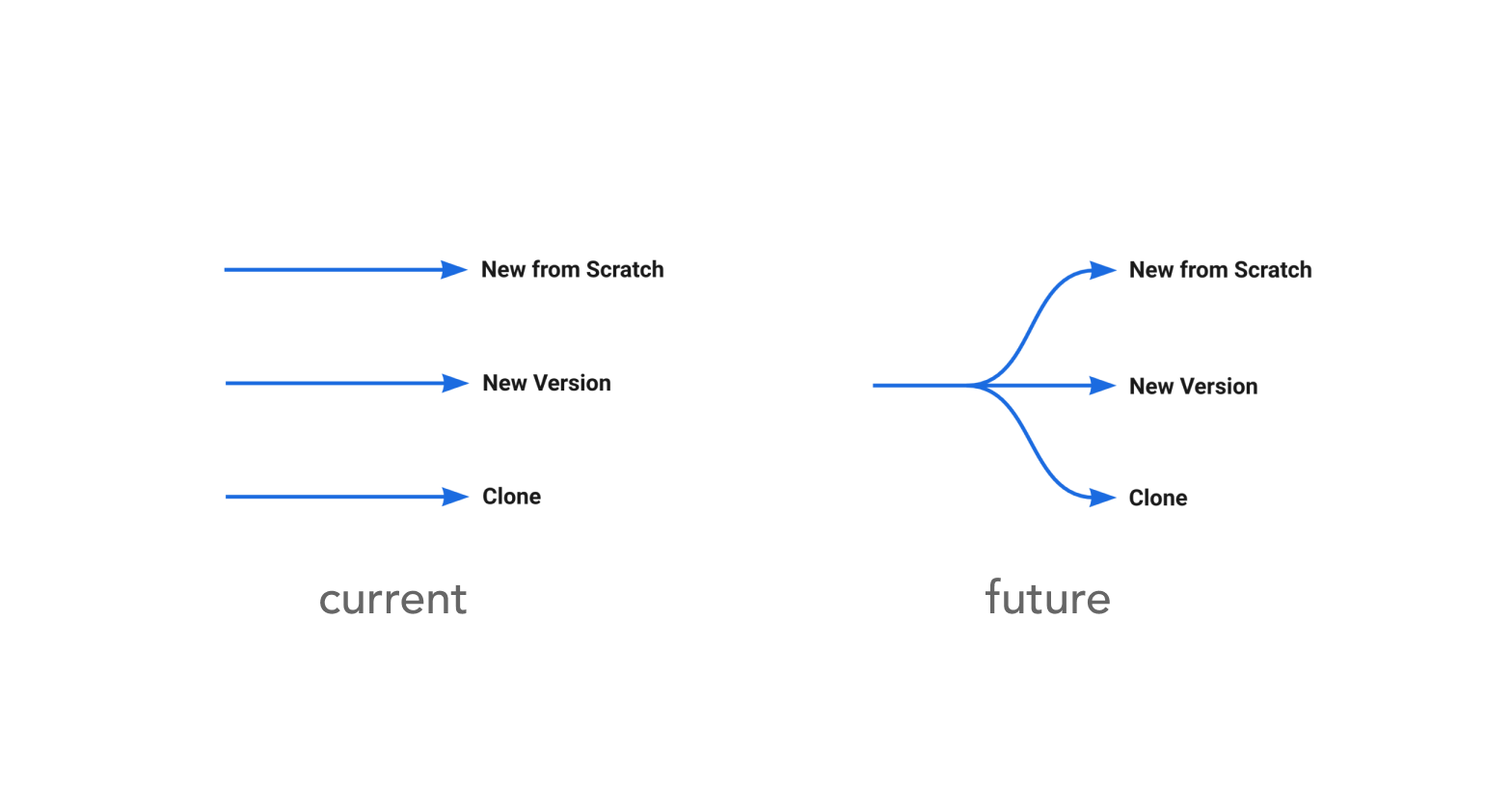
In a design sprint, it became apparent that we could consolidate three of the order entry methods into a single flow that branched out. This allowed users to enter as much information as they’d like while having maximum flexibility before committing to a method. Clear instructions at the fork provided users clarity regarding the different types of order entry and their use cases.

We then designed the granular flow, screens, and components to articulate this. The biggest challenge was how this deviated from most users' mental models around order entry. Thankfully this change was met very positively and in concept testing almost all users understood and preferred the new way after going through it once.

Late branching: unified entry versus three upfront paths — before and after.Late branching: unified entry versus three upfront paths — before and after.

One shared start: capture what you know first
Branch when context is sufficient — three legacy entry paths consolidated here
Order type A
Order type B
Order type C

Labels at the fork explain when to use each path — reducing “different but same” confusion from the legacy ERP.

Order-entry pain mapped to queue → gather → create → finish.Order-entry pain mapped to queue → gather → create → finish.

Safe Exploration

In a complex system it was essential that users were able to navigate, learn, and explore safely without constantly needing to ask their colleagues or referring to standard operating procedure documents. This would reduce the onboarding time, transition time, and training time required for new PM’s.

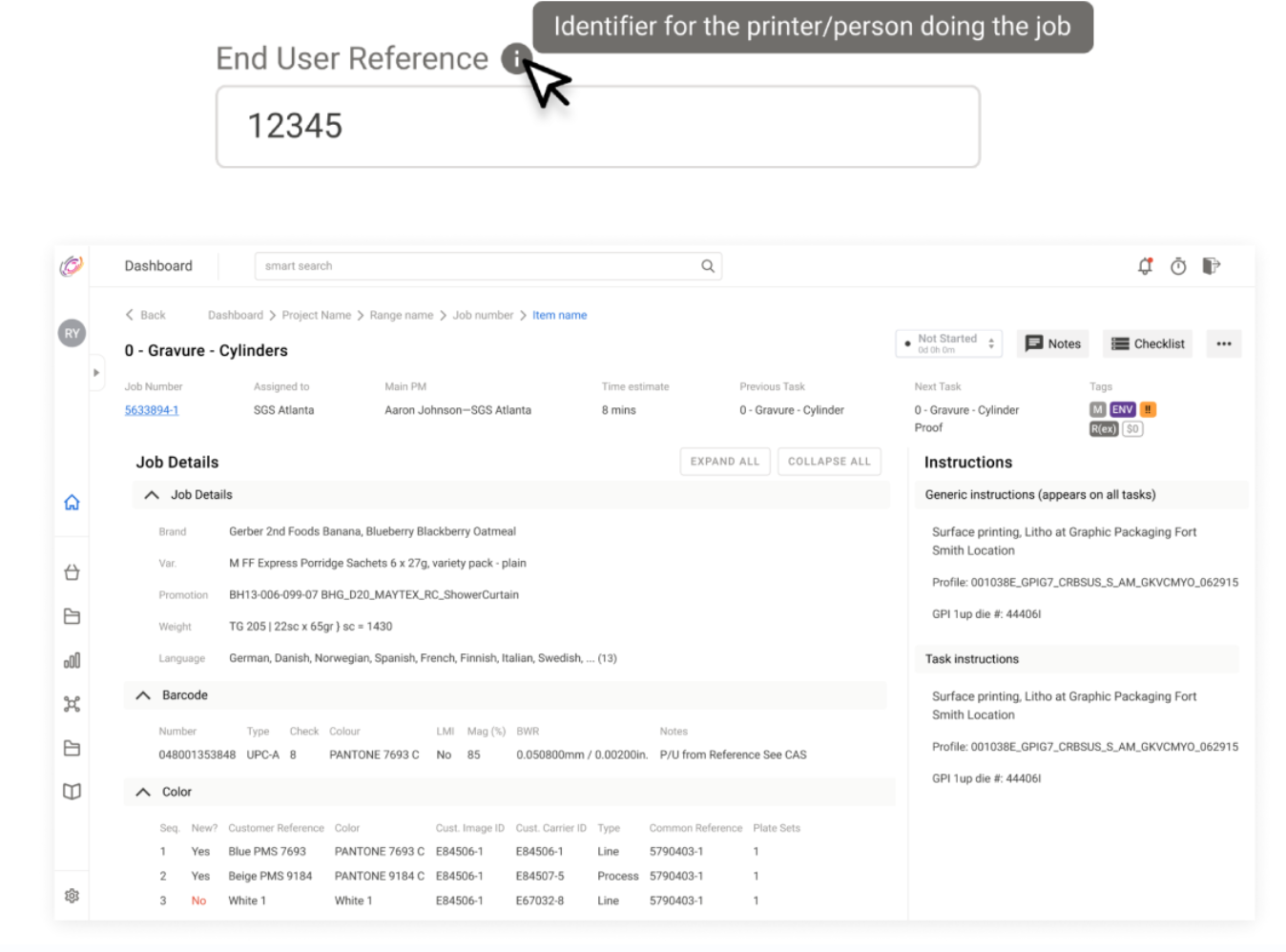
To do this I decided to lean into UX best practices to create clear client-side validations for form fields where possible, tool-tips to easily clarify, and effective breadcrumbing to help users maintain context of where they were in the system.

Tooltips and inline reference copy on dense job records — supporting safe exploration without SOPs.Tooltips and inline reference copy on dense job records — supporting safe exploration without SOPs.

Create a more useful experience for operators

In the legacy MySGS, operators worked at ‘task level’, but faced screens very similar to PMs who worked at a ‘job level’. To get to useful data, operators had to go through many screens and print paper copies. I wanted to make it easier for operators to stay within the ecosystem and have clarity around the tasks they’re working on. This would help ease the communication between the PM and the operator, and provide the PM with more clarity for project management.

To do this, we paired down our new PM dashboard and created an operator focused details screen. Upon selecting a task, the operator is given all the information they need in one centralized place.

This UI was more useful for operators who only needed to see all the printing details in a consolidated place, whereas the PM’s needed to see all the details. By providing operators with just the printing details upfront, it allowed them to get to work right away without clicking through multiple screens to gather information. The PM’s would continue to have their information spread out across tabs to increase visibility and reduce the cognitive load and interaction cost of scrolling through long pages.

Early operator flows — task screen, export, checklists, and commentsEarly operator flows — task screen, export, checklists, and comments

Operator task screen with specific job execution details.Operator task screen with specific job execution details.


Outcomes

Bookend: legacy job surface versus the next-gen dashboard direction we aligned on.Bookend: legacy job surface versus the next-gen dashboard direction we aligned on.

The re-imagined MySGS experience is currently being developed. The architecture and UX design principles we created have continued to provide the SGS internal team structure to engage users and improve experiences.

I redesigned the MySGS experience for PM’s and operators. We delivered screens and components pertinent to the PM dashboard, job creation, search, export, quality assurance, and relevant operator screens and components.

I also delivered a design system and guidelines for future improvements. By consolidating the user research, the product team at SGS now have more quantitative and qualitative data for future design endeavors.

Key insights

Designing for a complex enterprise product is quite different from consumer focused websites. These are some of my key insights:

  1. Context is boss: In a complex system users need to know where they are in relation to what they’re doing. I approached this by re-assessing the information architecture so that data would be appropriately grouped reducing the risk of users getting lost. Secondly robust breadcrumbing allows users to find their way out of whatever rabbit hole they entered. Lastly, increasing relevant data visibility, allows users to anchor themselves to familiar points. Awareness of context promotes user engagement in the system which leads to learning how to more effectively use it, data for future improvements.

  2. Safe exploration is a necessity: An emphasis on learnability and discoverability helps users of all experience levels to understand the system. This provides a better onboarding experience, and reduces the likelihood of issues becoming dev tickets. I approached this by creating more robust tool-tips, validations, and seamless transitions.

  3. Smaller tasks to keep users in the ecosystem: If the system only becomes useful and necessary when users have to make major time or data investments, then users will opt for alternatives where they can store that effort. Allowing users to complete smaller tasks encourages them to keep things in the ecosystem. For us, users don’t always have the information they need to complete a job at the beginning. We did this by giving users a simplified flow to start a job and flexible tooling to enter additional data, more complete jobs get entered into the system sooner.

  4. Auditing reveals huge opportunities: Auditing the system allowed us to identify many of the major improvements we could do and reveal future avenues to boost efficiency. For other enterprise products I’d advise a full audit at least once a year to identify major areas that could be reorganized, leveraged, or optimized.

Stakeholder feedback

Throughout the project I had the privilege of engaging with a variety of users and key stakeholders ranging from members of the c-suite to everyday users. It was invaluable to get such wide-ranging feedback as each person had varying pieces of context that helped me to deliver value in the solutions being proposed.

Although I didn’t use verbal feedback as any main form of validation, it was still nice to hear things like:

  1. “This will make training new PM’s so much easier”,
  2. “ Looks clean and user friendly. Heck of a lot better!”, and
  3. “Everything is easy to find and grouped nicely”

What this feedback did help with was growing excitement and alignment at SGS for the upcoming redesign.

Future opportunities

This is where the dreamer in me activates. So I apologize in advance if this becomes too feathery. I think that at SGS future opportunities could arise from automating many tasks.

SGS has been around for a long time, and as such has a lot of data that once cleaned could be used to train a machine to recognize and process orders effectively from emails. The data could also be leveraged for risk analysis and identifying the potentially challenging situations where human intervention could be beneficial. This would dramatically reduce costs and increase the speed at which SGS could work.

Secondly, I really believe in adaptive UI. After witnessing so many unique workflows, I think that with data, we could create a UI that changes based on each user's needs and interaction. This reduces the manual touch points needed to get information but rather feeds the user information as they need it.

Agentic systems (Added in retrospect)

This work predates the current wave of LLM productization, but the notes: email intake, adaptive UI, and PM task orchestration efficiency are the same product question in a new skin. For regulated operations and physical production, the bar isn't whether an agent can fill a form; it's whether a person can audit what happened, override wrong guesses, and trust the record when money and SLAs are on the line. I'd consider shipping AI-assisted flows as human-in-the-loop with explicit provenance.


Reflection

Throughout this project I learned more about how best practices change across use cases. I was reminded to let users and data inform me. It was really fun working together with a large team and being given an opportunity to lead more. It wasn’t always easy, as my transition of roles led me to often feel like I was drinking from a firehose while hitting the ground sprinting, but I also learned that I love to move quickly and learn quickly. I hope that my next roles will allow me to be in a fast moving environment where I can create a big impact.